

Matter Types
Smokeball comes with a range of pre-configured matter types for different areas of law. These are provided by Smokeball’s internal content team and are not user editable. A Matter Type defines what information can be saved to the matter, relevant to that area of law and state / location.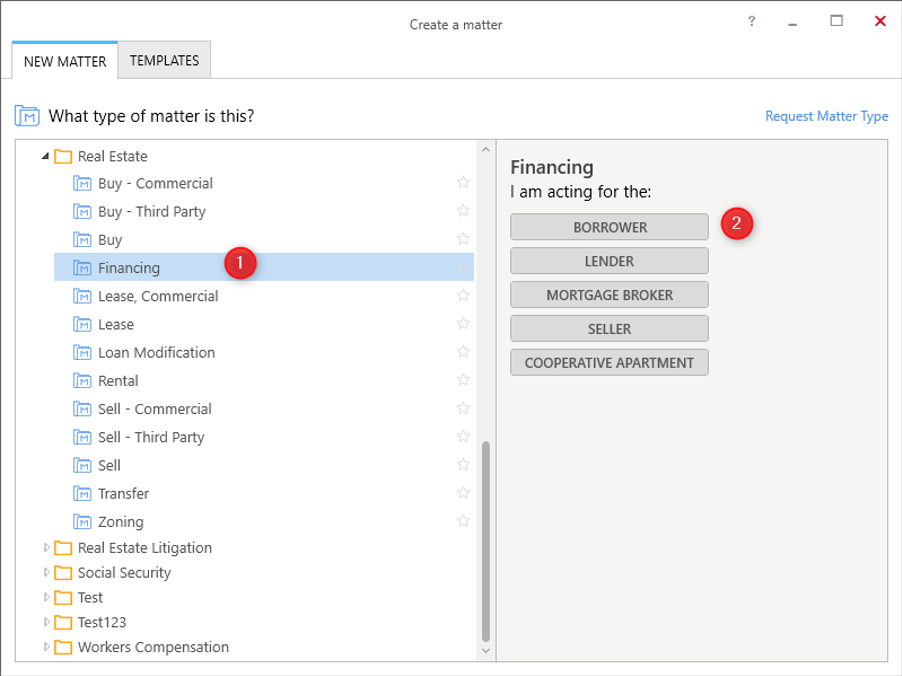
- A list of Matter Types. Here, Financing is a matter type, under the Real Estate category.
- Representative options for the Financing matter type. This specifies who the Smokeball firm is acting for. In other words, who is their client.
Getting a Matter Type
Here the important information to note is theidandrepresentativeOptionsof the matter type. We’ll need those when creating a matter.
Contacts
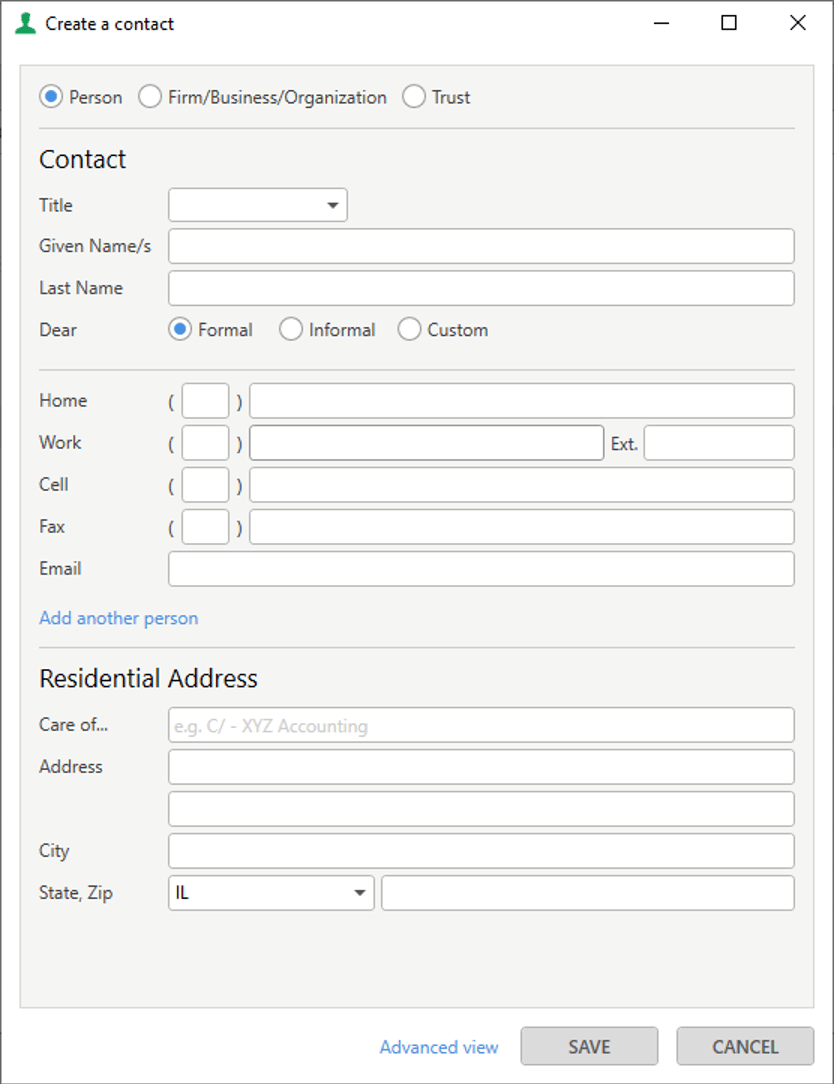
In order to successfully create a matter, we’re going to need to provide one or more contacts that are clients and/or other-sides (if applicable). In Smokeball’s desktop app you can create a contact as a Person, Firm/Business/Organization or Trust. Currently, the API supports the following contact types- Person
- Company
Creating contacts
To create a client contact you can make the following request which would create a person called ‘Test Contact’.id returned in the response, we’ll need that when creating a matter.
Alternatively, if the contact already exists in Smokeball, you can query it to find it’s id.
Tip
When creating a contact you can pass in anexternalSystemIdif you want to store your own reference id with this contact.
Staff
In Smokeball, staff can be assigned to a lead as the Attorney Responsible or the Person Assisting. The lead list can then be filtered by Attorney responsible, etc.
Creating a matter
Now we have everything we need to create a matter.string
required
Bearer token for user authentication.
Format:
Bearer YOUR_ACCESS_TOKENstring
required
Must be
application/json for this endpoint.string
The matter number.Can be left blank.
string
required
The matter type identifier.
Example:
8aca3574-aecb-4a6f-991d-680861bece1d_IL (the id we found earlier).array[string]
required
Contact Ids associated with the matter.
Minimum: 1 client required.Example:
["9a9ce552-6bee-45e4-8eb1-afe2c18c489f"]string
The client’s role in the Matter (e.g., “Borrower”, “Lender”).If left blank, the default role associated to the matter type will be used.Example:
"Borrower"string
The other side’s role in the Matter (e.g., “Borrower”, “Lender”).Example:
"Borrower"string
Description of the matter.Example:
"Created via API"string
Initial matter status (typically “Open”).Can be
Open, Pending, Closed, Deleted or CancelledExample: "Open"string
Lead creation date in ISO 8601 format (this can be backdated).Example:
"2020-05-20T04:20:55.035Z"string
Staff Id of the primary responsible staff member (optional).Example:
"c85d28cb-a760-4627-aa59-0a853c2e65ed"string
Staff Id of the assisting staff member (optional).Example:
"66f7fa24-bb03-4d89-ac28-e19620cc1e45"boolean
Whether the matter is marked as a lead (default: false).
Example:
true
Retrieving matters
Retrieving a matter
- Matters API
- MatterItems API
- Roles API
- Relationships API
Retrieving multiple matters
This endpoint can be used to sort, filter and retrieve one or more matters.number
Use this to limit number of records to be returned. Defaults to 500.
number
Use this to set offset for the records to be returned.
string
Use this to filter by matter type identifier.
string
Use this to filter by the contact identifier.
string
Use this to filter by current status of the matter. Possible values:
Open, Pending, Closed, Deleted or Cancelledboolean
Boolean flag to restrict search to
Leads.string
Use this to filter by matters updated since a specified time (.net ticks representation of the UTC datetime).
string
Use this to provide comma separated list of sort fields. Expected format
asc/desc(field). Sort fields currently supported: Status, LastUpdated - e.g. asc(Status), desc(LastUpdated)string
Use this to provide comma separated list of optional fields to include in the result. Optional fields currently supported:
Items.The matterResponseitemsfield is not returned by default. Use thefieldsin the request to include this in the result.
Matter Items
A matter can contain various items and sub items that store hierarchical data relevant to that area of law.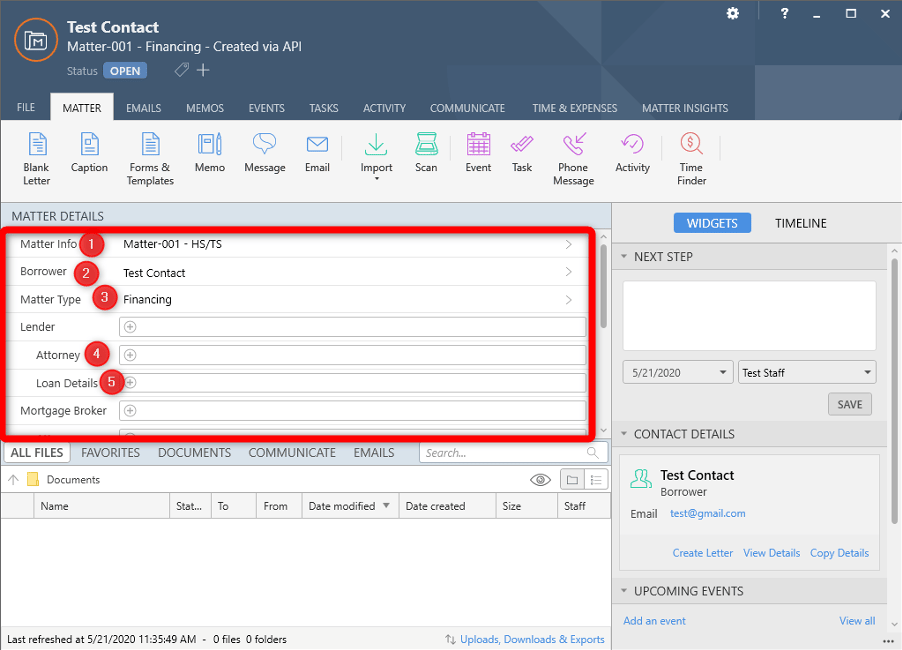
- Matter Info
- Borrower (Client)
- Client’s Attorney - this is always the Smokeball firm. This relationship is hidden in the desktop UI but can be seen in the API.
- Matter Type
- Lender (Other Side)
- Other Side’s Attorney
- Other Roles, Relationships and Layouts
Lender is a matter item, and Attorney and Loan Details are its subitems.
Here’s an example request to GET the Matter Items:
Some matter items can be hidden on the matter by default. This is usually done for roles that aren’t common on the matter. They are still exposed in the api as “visible: false”. Currently the visibility can only be changed in the Smokeball desktop app under Matter Settings (1).
Roles and Relationships
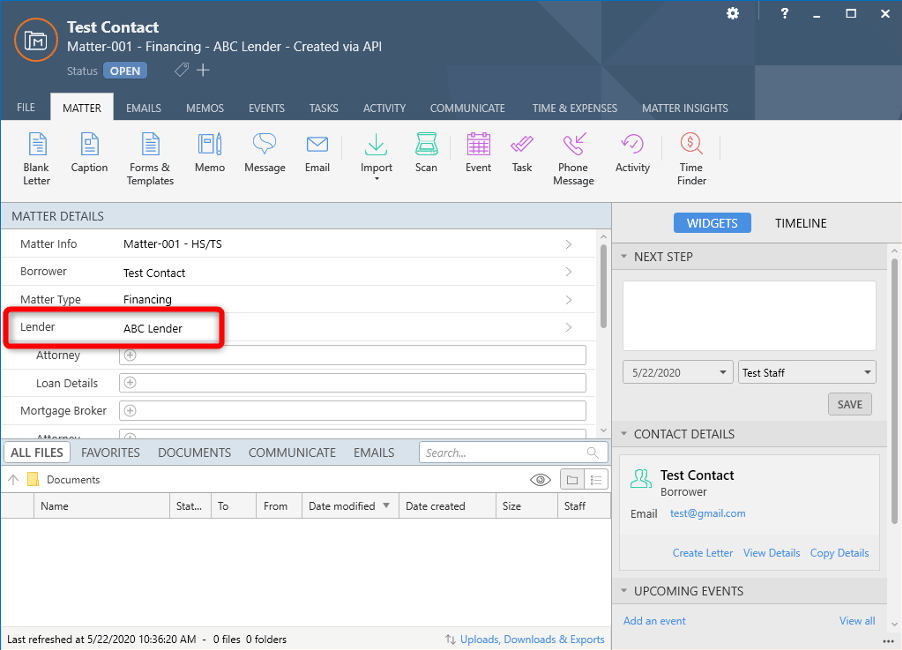
A contact on a matter will be assigned to a specific role or relationship, based on how they relate to the matter. For example, in the above image,Test Contact is assigned to the Borrower role (2). By convention, the first Role in the list is the firm’s client. The client role has an Attorney relationship that links to the Smokeball Firm (hidden in the Smokeball UI)
Contacts can also be related to other contacts on the matter. For example in the above image, Lender is a Role with an Attorney relationship (3). This attorney acts for this specific Lender. There could be other Lenders relationships on this matter that are related to other roles (not shown in image)
Roles and relationships can be set in the API.
Layouts
For a comprehensive guide to working with layouts including all field types, CRUD operations, and best practices, see the Layouts tutorial.
Loan Details layout (4) that would store information about that Lender’s loan. A layout can either be a sub item linked to a matter item (e.g. Loan Details as shown here) or a matter item itself (e.g. Property Details, not shown).
Following is a typical flow to get/set layout data.
- Get the layout design ID and currently set data by retrieving all the layout matter items
- Retrieve the full list of fields for the given layout design.
- Update the layout with new data values.
A field with typeRoleexpects an ID of a role. The name of the role needs to be the same as the layout field (e.g. for a field with keyMatter/CaseDetails/StandardCaseDetails/Judgeexpected role name isJudge).
A field with typeDateTimeexpects a UTC date/time in ISO 8601 format (e.g.2021-10-12T13:00:00.0000000Z).
Roles
To find out which contact is assigned to a role, we can get the role details:Setting a Role
In our example, the Lender role did not have a contact assigned. To set this, we first need to know the id / link to the role we want to update. This was retrieved earlier with the MatterItems api call: dcafdb9e-e46d-4720-a3f8-638b3dd4ca38 and now we want to assign it to this matter in the Lender role
Updating a matter
There are two ways to update a matter.Using PUT endpoint
This endpoint is similar to the endpoint used to create a new matter.- The
matterTypeIdfield can only be modified when converting aLeadto aMatter. - The
clientIdsfield cannot be modified. - The
otherSideIdsfield cannot be modified. - The
Mattercannot be converted back toLead.
Using PATCH endpoint
This endpoint can be used to update specific properties and also supports updating matter items, roles and relationships.Rule and limitations
The endpoint supports the following actions:- Updating one or more supported properties (keeping in mind the other rules that follow).
- Converting a lead to a matter - by setting
isLead: true -> isLead: false. - Updating
matterTypeIdandclientRolewhen a lead is being converted to matter. - Updating the clients and/or other sides using the
clientIdsandotherSideIdsproperties. - Updating matter items of provider type
roleandlayoutusing theitemsproperty.
- Converting a
Matterback to aLeadis not supported. - Updating
matterTypeIdandclientRoleon matters or on leads that are not being converted to matter is not supported. - Updating
itemsin a patch request where a lead is being converted to a matter is not supported. - Updating
itemsin a patch request where clients and/or other sides are being patched viaclientIdsandotherSideIdsproperties is not supported. - Updating matter
itemsof provider type other thanroleorlayoutis not supported. - Removing all items of a type is not supported.
items works:
- If the
itemsproperty is not passed in, they will be left unchanged. - There is no need to pass items of all types in a patch request.
- If one of more items of a type are being added/updated in the patch request, we must include all relevant items under that type (i.e., including the ones that are unchanged) in order to preserve them. Any existing item that is not included will be removed.
- The consumer cannot update the name on an item, e.g., the Vendor name.
- Contact Id must be provided when adding/update Items of role provider type.
- A new item/sub item of a ‘type’ can only be added if there is an existing item/sub item of that type already present in the lead/matter.