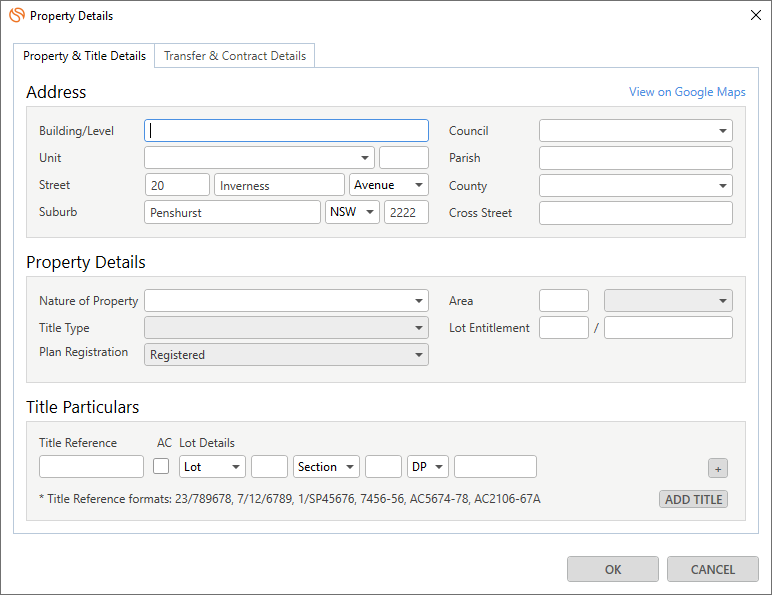
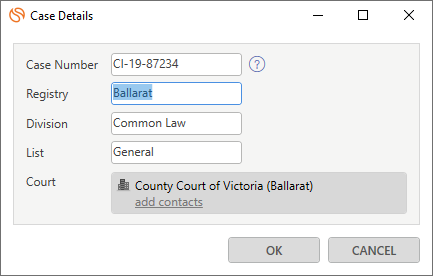
Layouts are User Interfaces that look different from each other, and are designed for a specific/unique purpose. They are designed and maintained by our product team. Each user interface has different fields pertinent to their unique purpose.
For example, we have a Property Details Layout for Conveyancing Matter Types:
Or, Case Details Layout for some Litigation Matter Types:
Data Mapping
How to get a list of layout fields that you can set up a mapping for:
- Get a reference for the layout design ID by querying a matter type.
GET https://api.smokeball.com.au/mattertypes/{matterTypeId}
Example response:
{
"href": "https://api.smokeball.com.au/mattertypes/9c6f59b6-3871-4fbd-a508-8fc43f03c6b4",
"items": [
{
"href": "https://api.smokeball.com.au/layouts/b571beb4-9175-436c-a70e-e70acb0f4ed2",
"rel": "layouts",
"id": "b571beb4-9175-436c-a70e-e70acb0f4ed2",
"providerId": "LayoutProvider",
"name": "Workers Comp Details"
}
],
"id": "9c6f59b6-3871-4fbd-a508-8fc43f03c6b4",
"versionId": "1bd57eaa-089c-4a92-8136-aed74bf5c389",
"name": "Workers Compensation",
"category": "Personal Injury",
"representativeOptions": [
"Worker",
"Employer"
],
"location": "NSW"
}
In this example, /items/0/id contains the layout design ID and /items/0/href contains a full URL to use in the next step.
- Retrieve the full list of fields for the given layout design.
GET https://api.smokeball.com/layouts/{layoutDesignId}
Example response:
{
"id": "b571beb4-9175-436c-a70e-e70acb0f4ed2",
"href": "https://api.smokeball.com.au/layouts/b571beb4-9175-436c-a70e-e70acb0f4ed2",
"fields": [
{
"name": "Matter/WorkersCompDetails/BodyPartInjured",
"type": "Text"
},
{
"name": "Matter/WorkersCompDetails/DateOfInjury",
"type": "DateTime"
},
{
"name": "Matter/WorkersCompDetails/DescriptionOfInjury",
"type": "Text"
}
],
"name": "Workers Comp Details"
}
In this example, /fields/*/name contain the layout fields that you can set up a mapping for.
Working with Layout Data
Once you’ve discovered the available layout designs, you can retrieve, create, update, and delete actual layout data on matters.
Retrieving All Layouts on a Matter
Get all layout items that exist on a matter, including both top-level layouts and sub-items.
curl --request GET "https://api.smokeball.com/matters/51cefb72-6247-4ca2-8926-5d14d65f7cb9/layouts" \
--header "x-api-key: Y2xpZW50X2lkOmNsaWV" \
--header "Authorization: Bearer Y2xpZW50X2lkOmNsaWV"
Example response:
HTTP/1.1 200 OK
Content-Type: application/json
{
"items": [
{
"id": "a1b2c3d4-1234-5678-9abc-def012345678",
"href": "https://api.smokeball.com/matters/51cefb72-6247-4ca2-8926-5d14d65f7cb9/layouts/a1b2c3d4-1234-5678-9abc-def012345678",
"itemId": "a1b2c3d4-1234-5678-9abc-def012345678",
"index": 0,
"parentItemId": null,
"layoutDesign": {
"id": "b571beb4-9175-436c-a70e-e70acb0f4ed2",
"href": "https://api.smokeball.com/layouts/b571beb4-9175-436c-a70e-e70acb0f4ed2",
"rel": "Layouts",
"name": "Workers Comp Details"
},
"values": [
{
"key": "Matter/WorkersCompDetails/BodyPartInjured",
"value": "Lower back"
},
{
"key": "Matter/WorkersCompDetails/DateOfInjury",
"value": "2024-06-15T14:30:00.0000000Z"
}
]
},
{
"id": "e5f6g7h8-5678-9012-3def-456789012345",
"href": "https://api.smokeball.com/matters/51cefb72-6247-4ca2-8926-5d14d65f7cb9/layouts/e5f6g7h8-5678-9012-3def-456789012345",
"itemId": "e5f6g7h8-5678-9012-3def-456789012345",
"index": 0,
"parentItemId": "d9e8f7a6-4321-8765-bcde-f123456789ab",
"layoutDesign": {
"id": "c8d9e0f1-2345-6789-0abc-123456789def",
"href": "https://api.smokeball.com/layouts/c8d9e0f1-2345-6789-0abc-123456789def",
"rel": "Layouts",
"name": "Loan Details"
},
"values": []
}
]
}
- Top-level layouts have
parentItemId: null (e.g., Workers Comp Details)
- Sub-item layouts have a
parentItemId referencing their parent layout (e.g., Loan Details under a Lender contact)
Retrieving a Specific Layout Item
Get detailed information about a single layout item, including all its field values.
curl --request GET "https://api.smokeball.com/matters/51cefb72-6247-4ca2-8926-5d14d65f7cb9/layouts/a1b2c3d4-1234-5678-9abc-def012345678" \
--header "x-api-key: Y2xpZW50X2lkOmNsaWV" \
--header "Authorization: Bearer Y2xpZW50X2lkOmNsaWV"
Example response:
HTTP/1.1 200 OK
Content-Type: application/json
{
"id": "a1b2c3d4-1234-5678-9abc-def012345678",
"href": "https://api.smokeball.com/matters/51cefb72-6247-4ca2-8926-5d14d65f7cb9/layouts/a1b2c3d4-1234-5678-9abc-def012345678",
"itemId": "a1b2c3d4-1234-5678-9abc-def012345678",
"index": 0,
"parentItemId": null,
"layoutDesign": {
"id": "b571beb4-9175-436c-a70e-e70acb0f4ed2",
"href": "https://api.smokeball.com/layouts/b571beb4-9175-436c-a70e-e70acb0f4ed2",
"rel": "Layouts"
},
"values": [
{
"key": "Matter/WorkersCompDetails/BodyPartInjured",
"value": "Lower back"
},
{
"key": "Matter/WorkersCompDetails/DateOfInjury",
"value": "2024-06-15T14:30:00.0000000Z"
},
{
"key": "Matter/WorkersCompDetails/DescriptionOfInjury",
"value": "Injury occurred while lifting heavy equipment"
}
]
}
Creating Layout Items
Add new layout data to a matter. This operation is asynchronous and returns a 202 Accepted response.
Adding a Top-Level Layout
Create a new layout item at the matter level with initial field values.
curl --request POST "https://api.smokeball.com/matters/51cefb72-6247-4ca2-8926-5d14d65f7cb9/layouts" \
--header "x-api-key: Y2xpZW50X2lkOmNsaWV" \
--header "Authorization: Bearer Y2xpZW50X2lkOmNsaWV" \
--header "Content-Type: application/json" \
--data-raw '{
"layoutDesignId": "b571beb4-9175-436c-a70e-e70acb0f4ed2",
"values": [
{
"key": "Matter/WorkersCompDetails/BodyPartInjured",
"value": "Lower back"
},
{
"key": "Matter/WorkersCompDetails/DateOfInjury",
"value": "2024-06-15T14:30:00.0000000Z"
}
]
}'
Example response:
HTTP/1.1 202 Accepted
Content-Type: application/json
{
"href": "https://api.smokeball.com/matters/51cefb72-6247-4ca2-8926-5d14d65f7cb9/layouts/a1b2c3d4-1234-5678-9abc-def012345678",
"rel": "Layouts"
}
Adding a Sub-Layout Item
Create a nested layout item under a parent layout by including the parentItemId.
curl --request POST "https://api.smokeball.com/matters/51cefb72-6247-4ca2-8926-5d14d65f7cb9/layouts" \
--header "x-api-key: Y2xpZW50X2lkOmNsaWV" \
--header "Authorization: Bearer Y2xpZW50X2lkOmNsaWV" \
--header "Content-Type: application/json" \
--data-raw '{
"layoutDesignId": "c8d9e0f1-2345-6789-0abc-123456789def",
"parentItemId": "d9e8f7a6-4321-8765-bcde-f123456789ab",
"values": [
{
"key": "Matter/LoanDetails/LoanAmount",
"value": "350000.00"
},
{
"key": "Matter/LoanDetails/InterestRate",
"value": "5.25"
}
]
}'
Understanding Async Operations
Layout creation and update operations are asynchronous and return a 202 Accepted response with a link to the resource being created or updated.
Best Practices:
- Use the returned
href to verify the operation completed successfully
- Implement retry logic for failed requests
- Consider using webhooks for completion notifications instead of polling
- Handle
503 Service Unavailable responses with exponential backoff
Updating Layout Data
Update field values on an existing layout item. This is a partial update operation - only the fields you specify will be changed.
curl --request PATCH "https://api.smokeball.com/matters/51cefb72-6247-4ca2-8926-5d14d65f7cb9/layouts/60efd655-cd1a-42cd-a170-a228cc09b5b1" \
--header "x-api-key: Y2xpZW50X2lkOmNsaWV" \
--header "Authorization: Bearer Y2xpZW50X2lkOmNsaWV" \
--header "Content-Type: application/json" \
--data-raw '{
"values": [
{
"key": "Matter/SettlementNegotiations/SettlementNegotiationsDetails/Note",
"value": "Updated settlement offer received"
},
{
"key": "Matter/SettlementNegotiations/SettlementNegotiationsDetails/OfferDate",
"value": "2024-07-20T09:15:00.0000000Z"
}
]
}'
Example response:
HTTP/1.1 202 Accepted
Content-Type: application/json
{
"href": "https://api.smokeball.com/matters/51cefb72-6247-4ca2-8926-5d14d65f7cb9/layouts/60efd655-cd1a-42cd-a170-a228cc09b5b1",
"rel": "Layouts"
}
The PATCH operation merges your changes with existing data. Only include the fields you want to update - other fields remain unchanged.
Deleting Layout Items
Remove a layout item from a matter. This operation is asynchronous and cannot be undone via the API.
curl --request DELETE "https://api.smokeball.com/matters/51cefb72-6247-4ca2-8926-5d14d65f7cb9/layouts/a1b2c3d4-1234-5678-9abc-def012345678" \
--header "x-api-key: Y2xpZW50X2lkOmNsaWV" \
--header "Authorization: Bearer Y2xpZW50X2lkOmNsaWV"
Example response:
Important considerations:
- Deletion is asynchronous (202 response)
- Deleting a parent layout may impact sub-items
- Deleted layouts cannot be recovered via the API
Field Type Reference
Each layout field has a specific type that determines how values should be formatted. Always retrieve the layout design first to understand field types before setting values.
Text Fields
Simple string values for text-based fields.
Example:
{
"key": "Matter/WorkersCompDetails/DescriptionOfInjury",
"value": "Injury occurred while lifting heavy equipment"
}
DateTime Fields
Date and time values must use ISO 8601 format in UTC timezone.
Format: YYYY-MM-DD
Example:
{
"key": "Matter/WorkersCompDetails/DateOfInjury",
"value": "2024-06-15"
}
Combobox Fields
Combobox fields must use a value from the predefined possibleValues list in the layout design.
Two-step process:
- Get the layout design to see allowed values:
{
"name": "Matter/PropertyDetails/PropertyType",
"type": "Combobox",
"possibleValues": [
"Residence",
"Commercial",
"Factory",
"Office"
]
}
- Use one of the allowed values:
{
"key": "Matter/PropertyDetails/PropertyType",
"value": "Residence"
}
Values are case-sensitive and must exactly match one of the possibleValues. Using an invalid value will result in a validation error.
Checkbox Fields
Boolean values represented as strings.
Allowed values: "true" or "false"
Example:
{
"key": "Matter/CaseDetails/IsRushOrder",
"value": "true"
}
{
"key": "Matter/PropertyDetails/RequiresNotarization",
"value": "false"
}
Number Fields
Numeric values represented as strings.
Examples:
{
"key": "Matter/SettlementNegotiations/ClaimAmount",
"value": "125000.50"
}
{
"key": "Matter/PropertyDetails/NumberOfBedrooms",
"value": "3"
}
Associate contacts with specific layout items (e.g., linking a lender contact to a loan details layout).
Retrieve all contacts associated with a layout item.
curl --request GET "https://api.smokeball.com/matters/51cefb72-6247-4ca2-8926-5d14d65f7cb9/layouts/e5f6g7h8-5678-9012-3def-456789012345/contacts" \
--header "x-api-key: Y2xpZW50X2lkOmNsaWV" \
--header "Authorization: Bearer Y2xpZW50X2lkOmNsaWV"
Example response:
HTTP/1.1 200 OK
Content-Type: application/json
[
{
"contactId": "1a2b3c4d-5678-90ab-cdef-123456789012",
"key": "Matter/LoanDetails/Lender",
}
]
Associate a contact with a layout item.
curl --request POST "https://api.smokeball.com/matters/51cefb72-6247-4ca2-8926-5d14d65f7cb9/layouts/e5f6g7h8-5678-9012-3def-456789012345/contacts" \
--header "x-api-key: Y2xpZW50X2lkOmNsaWV" \
--header "Authorization: Bearer Y2xpZW50X2lkOmNsaWV" \
--header "Content-Type: application/json" \
--data-raw '{
"contactId": "1a2b3c4d-5678-90ab-cdef-123456789012",
"key": "Matter/LoanDetails/Lender"
}'
If the specified key already references a contact, remove the existing role or relationship manually before adding a new contact.
Common Patterns & Best Practices
End-to-End Workflow: Property Purchase
Complete example for creating and populating a Property Details layout in a conveyancing matter:
1. Find the matter type and layout design
GET /mattertypes/{matterTypeId}
2. Get field definitions from the layout design
GET /layouts/{layoutDesignId}
3. Create the layout with initial data
POST /matters/{matterId}/layouts
{
"layoutDesignId": "property-details-layout-id",
"values": [
{
"key": "Matter/PropertyDetails/Address",
"value": "123 Main Street, Sydney NSW 2000"
},
{
"key": "Matter/PropertyDetails/PropertyType",
"value": "Residence"
}
]
}
4. Update as information becomes available
PATCH /matters/{matterId}/layouts/{layoutItemId}
{
"values": [
{
"key": "Matter/PropertyDetails/PurchasePrice",
"value": "750000.00"
},
{
"key": "Matter/PropertyDetails/SettlementDate",
"value": "2024-09-30T14:00:00.0000000Z"
}
]
}
Error Handling Strategies
Validate before sending:
- Check field types against layout design
- Validate DateTime format matches ISO 8601
- Confirm Combobox values are in possibleValues
Handle common errors:
400 Bad Request: Validation error - check field types and formats
404 Not Found: Layout design or matter doesn’t exist
503 Service Unavailable: Implement retry with exponential backoff
Use webhooks for async operations:
Instead of polling the returned href, configure webhooks to receive notifications when operations complete.