> ## Documentation Index
> Fetch the complete documentation index at: https://docs.smokeball.com/llms.txt
> Use this file to discover all available pages before exploring further.
# Files and Folders
> Create, add and update files and folders
## Structure
Every Matter has a familiar folder structure used to store files and documents:
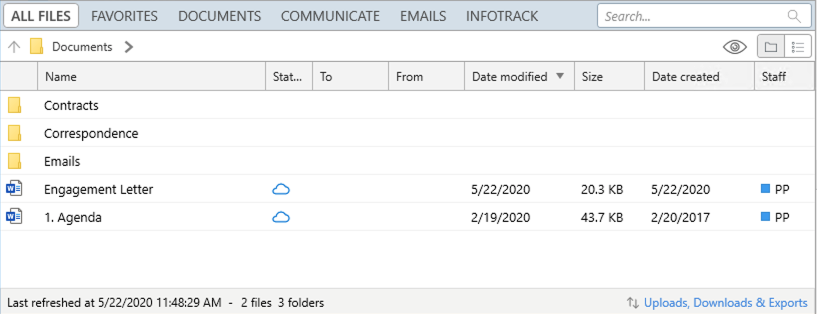 If you want to work with the folder/file structure, then you will need to use the GET folders endpoint.
Alternatively, if you prefer to work with a flat list of all Files on the Matter, you can use the GET files endpoint.
The root folder of a matter will always have an **id** of `null` and if no **folder id** is specified when adding a File, this is the folder that will be used by default.
Every folder including the root folder, will have a a number of sub-folders and files. When retrieveing a folder from the Folders endpoint you will get a list of the sub-folders and files in that folder. Here is a response for root folder of the Matter shown above:
```bash curl theme={"dark"}
curl --request GET "https://api.smokeball.com/matters/5bbc4d72-3001-46bf-acd7-c90dff4dc9fa/documents/folders" \
--header "x-api-key: Y2xpZW50X2lkOmNsaWV" \
--header "Authorization: Bearer Y2xpZW50X2lkOmNsaWV"
```
```json http theme={"dark"}
{
"method": "get",
"url": "https://api.smokeball.com/matters/5bbc4d72-3001-46bf-acd7-c90dff4dc9fa/documents/folders"
}
```
\*\* Response \*\*
```json theme={"dark"}
HTTP/1.1 200 OK
Content-Type: application/json
{
"value": [
{
"folders": [
{
"href": "https://api.smokeball.com/matters/5bbc4d72-3001-46bf-acd7-c90dff4dc9fa/documents/folders/27e52eaf-fa51-4582-bd59-ec3ea5ab664b",
"id": "27e52eaf-fa51-4582-bd59-ec3ea5ab664b",
"name": "Correspondence"
},
{
"href": "https://api.smokeball.com/matters/5bbc4d72-3001-46bf-acd7-c90dff4dc9fa/documents/folders/c2f7a537-4052-4bab-a4fb-84e0d7e7cef5",
"id": "c2f7a537-4052-4bab-a4fb-84e0d7e7cef5",
"name": "Contracts"
},
{
"href": "https://api.smokeball.com/matters/5bbc4d72-3001-46bf-acd7-c90dff4dc9fa/documents/folders/6f447d01-5379-493b-a60d-25fb4d64ff8a",
"id": "6f447d01-5379-493b-a60d-25fb4d64ff8a",
"name": "Emails"
}
],
"files": [
{
"href": "https://api.smokeball.com/matters/5bbc4d72-3001-46bf-acd7-c90dff4dc9fa/documents/files/95df25eb-dc99-45dd-881f-4608e00f551b",
"id": "95df25eb-dc99-45dd-881f-4608e00f551b",
"folder": {},
"name": "1. Agenda",
"fileExtension": ".docx",
"ownerId": "e3f545b4-34cf-49e5-b3e2-55ab0876a84c",
"dateCreated": "2017-02-20T05:50:30.1568284Z",
"sizeBytes": 44775,
"downloadInfo": {
"href": "https://api.smokeball.com/matters/5bbc4d72-3001-46bf-acd7-c90dff4dc9fa/documents/files/95df25eb-dc99-45dd-881f-4608e00f551b/download"
}
},
{
"href": "https://api.smokeball.com/matters/5bbc4d72-3001-46bf-acd7-c90dff4dc9fa/documents/files/6fd46dfa-a46d-4de4-9553-dae30f7f523a",
"id": "6fd46dfa-a46d-4de4-9553-dae30f7f523a",
"folder": {},
"name": "Engagement Letter",
"fileExtension": ".docx",
"ownerId": "e3f545b4-34cf-49e5-b3e2-55ab0876a84c",
"dateCreated": "2020-05-22T01:36:17.4355416Z",
"sizeBytes": 20793,
"downloadInfo": {
"href": "https://api.smokeball.com/matters/5bbc4d72-3001-46bf-acd7-c90dff4dc9fa/documents/files/6fd46dfa-a46d-4de4-9553-dae30f7f523a/download"
}
}
]
}
]
}
```
***
## Creating a Folder
You can create new folders within a matter to organize your files. Creating a folder is done by making a POST request to the folders endpoint.
```bash curl theme={"dark"}
curl --request POST "https://api.smokeball.com/matters/5bbc4d72-3001-46bf-acd7-c90dff4dc9fa/documents/folders" \
--header "x-api-key: Y2xpZW50X2lkOmNsaWV" \
--header "Authorization: Bearer Y2xpZW50X2lkOmNsaWV" \
--header "Content-Type: application/json" \
--data '{
"name": "Legal Documents",
"parentFolderId": "27e52eaf-fa51-4582-bd59-ec3ea5ab664b"
}'
```
```json http theme={"dark"}
{
"method": "post",
"url": "https://api.smokeball.com/matters/5bbc4d72-3001-46bf-acd7-c90dff4dc9fa/documents/folders",
"headers": {
"Content-Type": "application/json"
},
"body": {
"name": "Legal Documents",
"parentFolderId": "27e52eaf-fa51-4582-bd59-ec3ea5ab664b"
}
}
```
**Response**
```json theme={"dark"}
HTTP/1.1 202 Accepted
Content-Type: application/json
{
"href": "https://api.smokeball.com/matters/5bbc4d72-3001-46bf-acd7-c90dff4dc9fa/documents/folders/new-folder-id"
}
```
### Request Parameters
* **name** (required): The name of the folder to create. Must be between 1-256 characters.
* **parentFolderId** (optional): The unique identifier of the parent folder where the new folder should be created.
* **userId** (optional): The unique identifier of the user creating the folder. If not provided, defaults to the authenticated user.
### Parent Folder Behavior
* **Root Folder Creation**: When `parentFolderId` is `null` or not provided, the folder will be created in the root directory of the matter.
* **Subfolder Creation**: When `parentFolderId` is specified with a valid folder ID, the new folder will be created as a subdirectory of that parent folder.
### Duplicate Folder Names
The API allows multiple folders with the same name to exist within the same parent directory. If you attempt to create a folder with a name that already exists in the target location, the API will create a new folder with the same name rather than returning an error or the existing folder. This gives you flexibility in organizing your folder structure as needed.
### Example: Creating a Root Folder
To create a folder in the root directory, omit the `parentFolderId` or set it to `null`:
```bash curl theme={"dark"}
curl --request POST "https://api.smokeball.com/matters/5bbc4d72-3001-46bf-acd7-c90dff4dc9fa/documents/folders" \
--header "x-api-key: Y2xpZW50X2lkOmNsaWV" \
--header "Authorization: Bearer Y2xpZW50X2lkOmNsaWV" \
--header "Content-Type: application/json" \
--data '{
"name": "Case Files"
}'
```
```json http theme={"dark"}
{
"method": "post",
"url": "https://api.smokeball.com/matters/5bbc4d72-3001-46bf-acd7-c90dff4dc9fa/documents/folders",
"headers": {
"Content-Type": "application/json"
},
"body": {
"name": "Case Files",
"parentFolderId": null
}
}
```
***
## Adding a File
Adding a File to a Matter is a two-step process involving creating the meta-data for the File by POSTing to the files endpoint and then using the response to upload the actual file to the provided URL.
Continuing with the Matter example above, if we wanted to add a File to the *Correspondence* folder we would make the following request:
```bash curl theme={"dark"}
curl --request POST "https://api.smokeball.com/matters/5bbc4d72-3001-46bf-acd7-c90dff4dc9fa/documents/files" \
--header "x-api-key: Y2xpZW50X2lkOmNsaWV" \
--header "Authorization: Bearer Y2xpZW50X2lkOmNsaWV"
```
```json http theme={"dark"}
{
"method": "post",
"url": "https://api.smokeball.com/matters/{matterId}/documents/files",
"headers": {
"Content-Type": "application/json"
},
"body": "{\n \"fileName\": \"Letter to Creditor.docx\",\n \"folderId\": \"27e52eaf-fa51-4582-bd59-ec3ea5ab664b\",\n //\"dateCreated\": if not specified, the current datetime will be used\n}",
"path": {
"matterId": "5bbc4d72-3001-46bf-acd7-c90dff4dc9fa"
}
}
```
**Response**
```json theme={"dark"}
{
"fileId": "e8ac0461-6bd9-477e-a95b-1d924332c91b",
"uploadUrl": "https://s3.amazonaws.com/MatterManagement.Staging/apiuploads/ODUyOGQwNjMtMjY2My00MWMwLTk0ZjQtN2JhMzNlYTRhNmQ0fGUzZjU0NWI0LTM0Y2YtNDllNS1iM2UyLTU1YWIwODc2YTg0Y3w1YmJjNGQ3Mi0zMDAxLTQ2YmYtYWNkNy1jOTBkZmY0ZGM5ZmF8MjdlNTJlYWYtZmE1MS00NTgyLWJkNTktZWMzZWE1YWI2NjRifGU4YWMwNDYxLTZiZDktNDc3ZS1hOTViLTFkOTI0MzMyYzkxYnxMZXR0ZXIgdG8gQ3JlZGl0b3IuZG9jeHw%3D?AWSAccessKeyId=ASIA364TCXVMR4RXEVO5&Expires=1590117388&x-amz-security-token=IQoJb3JpZ2luX2VjEOL%2F%2F%2F%2F%2F%2F%2F%2F%2F%2FwEaCXVzLWVhc3QtMSJHMEUCIFTtWItZ%2Bdjveha7XuP4a05FCTqJmEs0G4VawxdRSaQ1AiEAvi%2FCGd0kyF%2FdDugSrNbl1sMPWSOIgtD%2B4jEAHP3BPnAq3wEIOxAAGgw4MjIyNTc4MjcxNjEiDDEkwjUUF2iV7yoZVCq8AeptjefBs2u6Wn2hFiAdoPw%2F9rGsXkXGfsbyPCDKeJP2yBzpNLGsPiKZkrvrJNNY5t8eViRNqSw69qt2qH4I50Q3O5iwg8kYguCZmFRJ6Gu4g89Og5kdX5FfISdzzoz4zRyVqHUg8j1RkXvaw6o6hpBGjwyLZL24dKqtRvgylLY4faQixoZ2hWYRkT87cuxwj2BOTTt6SNpKze0Atqh6QOV2LokwpIiQo1%2Bd5Ua0nC0Xl39P4pej17W43bDmMOzUnPYFOuABSZPF2G1tnIhP%2BuLtK9HvMobUUPk5cFLcKN5QxIW2hjwlwTZF3IPsvUOVq0AO0UnJd%2By4NdfwCcpm2fUulDFl8y5wKh3%2B0BifQDfsclANHL4Bb6na0Qpp8076HWiN6kbj7HRFNW4mTtsga%2BhK4kYHwAVhS6JR9bm46bz%2FsylzvuhLnIR1eG%2BUpZLJos6LJONIn9MNK78CXY6HJxaDLaewoQ3tAhU8CF%2F6mT3Oel2ZXeY40wm3xh2aqZS%2F9nze94RpJr%2Bf2U%2FHPH8tkB8tsAjflFIA4rGX%2B0BEfqJEWWalQVo%3D&Signature=sQ%2BUezLoeweLtLhyCDK%2Fy1a6naY%3D",
"expiry": "2020-05-22T03:16:28.3870695Z"
}
```
You will get back the `fileId` of the new File and an `uploadUrl` that you can use to upload the actual file to AWS S3 with a PUT request. The uploadUrl will be valid up until the time specified in the `expiry` field.
> For detailed instructions on uploading files using pre-signed S3 URLs, see the [AWS documentation on using presigned URLs](https://docs.aws.amazon.com/AmazonS3/latest/userguide/using-presigned-url.html). The documentation covers request headers, content types, and example code in multiple languages.
***
## Uploading a new version
To upload a new version of a file to an existing File on a Matter you need to get a new upload URL from the files endpoint:
```bash curl theme={"dark"}
curl --request GET "https://api.smokeball.com/matters/5bbc4d72-3001-46bf-acd7-c90dff4dc9fa/documents/files/e8ac0461-6bd9-477e-a95b-1d924332c91b/upload" \
--header "x-api-key: Y2xpZW50X2lkOmNsaWV" \
--header "Authorization: Bearer Y2xpZW50X2lkOmNsaWV"
```
```json http theme={"dark"}
{
"method": "get",
"url": "https://api.smokeball.com/matters/5bbc4d72-3001-46bf-acd7-c90dff4dc9fa/documents/files/e8ac0461-6bd9-477e-a95b-1d924332c91b/upload"
}
```
**Response**
```json theme={"dark"}
HTTP/1.1 200 OK
Content-Type: application/json
{
"fileId": "e8ac0461-6bd9-477e-a95b-1d924332c91b",
"uploadUrl": "https://s3.amazonaws.com/MatterManagement.Staging/apiuploads/ODUyOGQwNjMtMjY2My00MWMwLTk0ZjQtN2JhMzNlYTRhNmQ0fGUzZjU0NWI0LTM0Y2YtNDllNS1iM2UyLTU1YWIwODc2YTg0Y3w1YmJjNGQ3Mi0zMDAxLTQ2YmYtYWNkNy1jOTBkZmY0ZGM5ZmF8MjdlNTJlYWYtZmE1MS00NTgyLWJkNTktZWMzZWE1YWI2NjRifGU4YWMwNDYxLTZiZDktNDc3ZS1hOTViLTFkOTI0MzMyYzkxYnxMZXR0ZXIgdG8gQ3JlZGl0b3IuZG9jeHw%3D?AWSAccessKeyId=ASIA364TCXVMR4RXEVO5&Expires=1590117388&x-amz-security-token=IQoJb3JpZ2luX2VjEOL%2F%2F%2F%2F%2F%2F%2F%2F%2F%2FwEaCXVzLWVhc3QtMSJHMEUCIFTtWItZ%2Bdjveha7XuP4a05FCTqJmEs0G4VawxdRSaQ1AiEAvi%2FCGd0kyF%2FdDugSrNbl1sMPWSOIgtD%2B4jEAHP3BPnAq3wEIOxAAGgw4MjIyNTc4MjcxNjEiDDEkwjUUF2iV7yoZVCq8AeptjefBs2u6Wn2hFiAdoPw%2F9rGsXkXGfsbyPCDKeJP2yBzpNLGsPiKZkrvrJNNY5t8eViRNqSw69qt2qH4I50Q3O5iwg8kYguCZmFRJ6Gu4g89Og5kdX5FfISdzzoz4zRyVqHUg8j1RkXvaw6o6hpBGjwyLZL24dKqtRvgylLY4faQixoZ2hWYRkT87cuxwj2BOTTt6SNpKze0Atqh6QOV2LokwpIiQo1%2Bd5Ua0nC0Xl39P4pej17W43bDmMOzUnPYFOuABSZPF2G1tnIhP%2BuLtK9HvMobUUPk5cFLcKN5QxIW2hjwlwTZF3IPsvUOVq0AO0UnJd%2By4NdfwCcpm2fUulDFl8y5wKh3%2B0BifQDfsclANHL4Bb6na0Qpp8076HWiN6kbj7HRFNW4mTtsga%2BhK4kYHwAVhS6JR9bm46bz%2FsylzvuhLnIR1eG%2BUpZLJos6LJONIn9MNK78CXY6HJxaDLaewoQ3tAhU8CF%2F6mT3Oel2ZXeY40wm3xh2aqZS%2F9nze94RpJr%2Bf2U%2FHPH8tkB8tsAjflFIA4rGX%2B0BEfqJEWWalQVo%3D&Signature=sQ%2BUezLoeweLtLhyCDK%2Fy1a6naY%3D",
"expiry": "2020-05-22T03:16:28.3870695Z"
}
```
You will get back an `uploadUrl` that you can use to upload the new version to AWS S3 with a PUT request. The uploadUrl will be valid up until the time specified in the `expiry` field.
> For detailed instructions on uploading files using pre-signed S3 URLs, see the [AWS documentation on using presigned URLs](https://docs.aws.amazon.com/AmazonS3/latest/userguide/using-presigned-url.html). The documentation covers request headers, content types, and example code in multiple languages.
***
## Downloading a File
To download a file you need to make a request to the files endpoint to get a temporary `downloadUrl`:
```html theme={"dark"}
GET https://api.smokeball.com/matters/5bbc4d72-3001-46bf-acd7-c90dff4dc9fa/documents/files/95df25eb-dc99-45dd-881f-4608e00f551b/download
```
**Response**
```json theme={"dark"}
{
"fileId": "95df25eb-dc99-45dd-881f-4608e00f551b",
"downloadUrl": "https://s3.amazonaws.com/MatterManagement.Staging/managefiles3/8528d063-2663-41c0-94f4-7ba33ea4a6d4/AC8/AC83F922D6C7912EF74A9CA025C14526?AWSAccessKeyId=ASIA364TCXVM7BWHXPON&Expires=1590130239&response-content-disposition=attachment%3B%20filename%3D%221.%20Agenda.docx%22&x-amz-security-token=IQoJb3JpZ2luX2VjEOb%2F%2F%2F%2F%2F%2F%2F%2F%2F%2FwEaCXVzLWVhc3QtMSJIMEYCIQCRB6GR88g1BrLlsEkCBB6Dp2VwKkWZ7mqzRZ9mQj5%2FgwIhAK%2BP28pVL4rmsvILpGq%2BM9oLwIS8Xvuy2DfbwKkZ6EXbKt8BCD8QABoMODIyMjU3ODI3MTYxIgzsM8IXTaCCGbfc90MqvAFI7iuN%2F9EVCgBTR0x4mMDoBH0beid591RJ0zsrpAGBwJ4QTYHLYzwMWRGPgAu39oDK0bUyrX5WIb6iq8G5XrBB5K0IkgEuGMSX7U0Yf8xu8QjdtusV6YbbS4hQ3L5NrDpcbZMJ12cpF3hn65hXIBSwzRMhYN4iSumxDUiGmTDNwpH83fXmvLBoPkzxUHEYlBJzLR7VqxA1G0AGQGdLNwLf29Riry84%2BpsSANNuiYh1eQSf95Rsnqc%2BiU62ZDDQyZ32BTrfAcJpfDz6Y%2Ft3GPK0sEXQHZT6%2BbnvqZC8IJFbJdkkCNQBRF5YAaE6b3NKAilCeq2gb81BQW3fEYjud9wYmRcKIpTcMAAI90JLYAkPcgNO0wTouslW5yuiqnKG%2FZZ8dCDNm%2FocBzwGRR7%2B%2Fro9sTBrT1L1%2FM%2B1eeZNiFKa45aovAZ1AnkcigFej9oIZKmkOPuEFSuP8tUFQ5IblTKxsNoipRe1LbknxF008t5x8Yb%2Bskn7jBRO6OlYzgsddaOPDD0giMjh4KwuVDAI4PQCSx1CMmq2xT9wtlG2BNHD5eT%2FKpc%3D&Signature=e0pmX3UMd%2FrZN%2FJrLswk2y7NG40%3D",
"expiry": "2020-05-22T06:50:39.4054085Z",
"sizeBytes": 44775
}
```
> The `downloadUrl` will be valid up until the time specified in the `expiry` field.
If you want to work with the folder/file structure, then you will need to use the GET folders endpoint.
Alternatively, if you prefer to work with a flat list of all Files on the Matter, you can use the GET files endpoint.
The root folder of a matter will always have an **id** of `null` and if no **folder id** is specified when adding a File, this is the folder that will be used by default.
Every folder including the root folder, will have a a number of sub-folders and files. When retrieveing a folder from the Folders endpoint you will get a list of the sub-folders and files in that folder. Here is a response for root folder of the Matter shown above:
```bash curl theme={"dark"}
curl --request GET "https://api.smokeball.com/matters/5bbc4d72-3001-46bf-acd7-c90dff4dc9fa/documents/folders" \
--header "x-api-key: Y2xpZW50X2lkOmNsaWV" \
--header "Authorization: Bearer Y2xpZW50X2lkOmNsaWV"
```
```json http theme={"dark"}
{
"method": "get",
"url": "https://api.smokeball.com/matters/5bbc4d72-3001-46bf-acd7-c90dff4dc9fa/documents/folders"
}
```
\*\* Response \*\*
```json theme={"dark"}
HTTP/1.1 200 OK
Content-Type: application/json
{
"value": [
{
"folders": [
{
"href": "https://api.smokeball.com/matters/5bbc4d72-3001-46bf-acd7-c90dff4dc9fa/documents/folders/27e52eaf-fa51-4582-bd59-ec3ea5ab664b",
"id": "27e52eaf-fa51-4582-bd59-ec3ea5ab664b",
"name": "Correspondence"
},
{
"href": "https://api.smokeball.com/matters/5bbc4d72-3001-46bf-acd7-c90dff4dc9fa/documents/folders/c2f7a537-4052-4bab-a4fb-84e0d7e7cef5",
"id": "c2f7a537-4052-4bab-a4fb-84e0d7e7cef5",
"name": "Contracts"
},
{
"href": "https://api.smokeball.com/matters/5bbc4d72-3001-46bf-acd7-c90dff4dc9fa/documents/folders/6f447d01-5379-493b-a60d-25fb4d64ff8a",
"id": "6f447d01-5379-493b-a60d-25fb4d64ff8a",
"name": "Emails"
}
],
"files": [
{
"href": "https://api.smokeball.com/matters/5bbc4d72-3001-46bf-acd7-c90dff4dc9fa/documents/files/95df25eb-dc99-45dd-881f-4608e00f551b",
"id": "95df25eb-dc99-45dd-881f-4608e00f551b",
"folder": {},
"name": "1. Agenda",
"fileExtension": ".docx",
"ownerId": "e3f545b4-34cf-49e5-b3e2-55ab0876a84c",
"dateCreated": "2017-02-20T05:50:30.1568284Z",
"sizeBytes": 44775,
"downloadInfo": {
"href": "https://api.smokeball.com/matters/5bbc4d72-3001-46bf-acd7-c90dff4dc9fa/documents/files/95df25eb-dc99-45dd-881f-4608e00f551b/download"
}
},
{
"href": "https://api.smokeball.com/matters/5bbc4d72-3001-46bf-acd7-c90dff4dc9fa/documents/files/6fd46dfa-a46d-4de4-9553-dae30f7f523a",
"id": "6fd46dfa-a46d-4de4-9553-dae30f7f523a",
"folder": {},
"name": "Engagement Letter",
"fileExtension": ".docx",
"ownerId": "e3f545b4-34cf-49e5-b3e2-55ab0876a84c",
"dateCreated": "2020-05-22T01:36:17.4355416Z",
"sizeBytes": 20793,
"downloadInfo": {
"href": "https://api.smokeball.com/matters/5bbc4d72-3001-46bf-acd7-c90dff4dc9fa/documents/files/6fd46dfa-a46d-4de4-9553-dae30f7f523a/download"
}
}
]
}
]
}
```
***
## Creating a Folder
You can create new folders within a matter to organize your files. Creating a folder is done by making a POST request to the folders endpoint.
```bash curl theme={"dark"}
curl --request POST "https://api.smokeball.com/matters/5bbc4d72-3001-46bf-acd7-c90dff4dc9fa/documents/folders" \
--header "x-api-key: Y2xpZW50X2lkOmNsaWV" \
--header "Authorization: Bearer Y2xpZW50X2lkOmNsaWV" \
--header "Content-Type: application/json" \
--data '{
"name": "Legal Documents",
"parentFolderId": "27e52eaf-fa51-4582-bd59-ec3ea5ab664b"
}'
```
```json http theme={"dark"}
{
"method": "post",
"url": "https://api.smokeball.com/matters/5bbc4d72-3001-46bf-acd7-c90dff4dc9fa/documents/folders",
"headers": {
"Content-Type": "application/json"
},
"body": {
"name": "Legal Documents",
"parentFolderId": "27e52eaf-fa51-4582-bd59-ec3ea5ab664b"
}
}
```
**Response**
```json theme={"dark"}
HTTP/1.1 202 Accepted
Content-Type: application/json
{
"href": "https://api.smokeball.com/matters/5bbc4d72-3001-46bf-acd7-c90dff4dc9fa/documents/folders/new-folder-id"
}
```
### Request Parameters
* **name** (required): The name of the folder to create. Must be between 1-256 characters.
* **parentFolderId** (optional): The unique identifier of the parent folder where the new folder should be created.
* **userId** (optional): The unique identifier of the user creating the folder. If not provided, defaults to the authenticated user.
### Parent Folder Behavior
* **Root Folder Creation**: When `parentFolderId` is `null` or not provided, the folder will be created in the root directory of the matter.
* **Subfolder Creation**: When `parentFolderId` is specified with a valid folder ID, the new folder will be created as a subdirectory of that parent folder.
### Duplicate Folder Names
The API allows multiple folders with the same name to exist within the same parent directory. If you attempt to create a folder with a name that already exists in the target location, the API will create a new folder with the same name rather than returning an error or the existing folder. This gives you flexibility in organizing your folder structure as needed.
### Example: Creating a Root Folder
To create a folder in the root directory, omit the `parentFolderId` or set it to `null`:
```bash curl theme={"dark"}
curl --request POST "https://api.smokeball.com/matters/5bbc4d72-3001-46bf-acd7-c90dff4dc9fa/documents/folders" \
--header "x-api-key: Y2xpZW50X2lkOmNsaWV" \
--header "Authorization: Bearer Y2xpZW50X2lkOmNsaWV" \
--header "Content-Type: application/json" \
--data '{
"name": "Case Files"
}'
```
```json http theme={"dark"}
{
"method": "post",
"url": "https://api.smokeball.com/matters/5bbc4d72-3001-46bf-acd7-c90dff4dc9fa/documents/folders",
"headers": {
"Content-Type": "application/json"
},
"body": {
"name": "Case Files",
"parentFolderId": null
}
}
```
***
## Adding a File
Adding a File to a Matter is a two-step process involving creating the meta-data for the File by POSTing to the files endpoint and then using the response to upload the actual file to the provided URL.
Continuing with the Matter example above, if we wanted to add a File to the *Correspondence* folder we would make the following request:
```bash curl theme={"dark"}
curl --request POST "https://api.smokeball.com/matters/5bbc4d72-3001-46bf-acd7-c90dff4dc9fa/documents/files" \
--header "x-api-key: Y2xpZW50X2lkOmNsaWV" \
--header "Authorization: Bearer Y2xpZW50X2lkOmNsaWV"
```
```json http theme={"dark"}
{
"method": "post",
"url": "https://api.smokeball.com/matters/{matterId}/documents/files",
"headers": {
"Content-Type": "application/json"
},
"body": "{\n \"fileName\": \"Letter to Creditor.docx\",\n \"folderId\": \"27e52eaf-fa51-4582-bd59-ec3ea5ab664b\",\n //\"dateCreated\": if not specified, the current datetime will be used\n}",
"path": {
"matterId": "5bbc4d72-3001-46bf-acd7-c90dff4dc9fa"
}
}
```
**Response**
```json theme={"dark"}
{
"fileId": "e8ac0461-6bd9-477e-a95b-1d924332c91b",
"uploadUrl": "https://s3.amazonaws.com/MatterManagement.Staging/apiuploads/ODUyOGQwNjMtMjY2My00MWMwLTk0ZjQtN2JhMzNlYTRhNmQ0fGUzZjU0NWI0LTM0Y2YtNDllNS1iM2UyLTU1YWIwODc2YTg0Y3w1YmJjNGQ3Mi0zMDAxLTQ2YmYtYWNkNy1jOTBkZmY0ZGM5ZmF8MjdlNTJlYWYtZmE1MS00NTgyLWJkNTktZWMzZWE1YWI2NjRifGU4YWMwNDYxLTZiZDktNDc3ZS1hOTViLTFkOTI0MzMyYzkxYnxMZXR0ZXIgdG8gQ3JlZGl0b3IuZG9jeHw%3D?AWSAccessKeyId=ASIA364TCXVMR4RXEVO5&Expires=1590117388&x-amz-security-token=IQoJb3JpZ2luX2VjEOL%2F%2F%2F%2F%2F%2F%2F%2F%2F%2FwEaCXVzLWVhc3QtMSJHMEUCIFTtWItZ%2Bdjveha7XuP4a05FCTqJmEs0G4VawxdRSaQ1AiEAvi%2FCGd0kyF%2FdDugSrNbl1sMPWSOIgtD%2B4jEAHP3BPnAq3wEIOxAAGgw4MjIyNTc4MjcxNjEiDDEkwjUUF2iV7yoZVCq8AeptjefBs2u6Wn2hFiAdoPw%2F9rGsXkXGfsbyPCDKeJP2yBzpNLGsPiKZkrvrJNNY5t8eViRNqSw69qt2qH4I50Q3O5iwg8kYguCZmFRJ6Gu4g89Og5kdX5FfISdzzoz4zRyVqHUg8j1RkXvaw6o6hpBGjwyLZL24dKqtRvgylLY4faQixoZ2hWYRkT87cuxwj2BOTTt6SNpKze0Atqh6QOV2LokwpIiQo1%2Bd5Ua0nC0Xl39P4pej17W43bDmMOzUnPYFOuABSZPF2G1tnIhP%2BuLtK9HvMobUUPk5cFLcKN5QxIW2hjwlwTZF3IPsvUOVq0AO0UnJd%2By4NdfwCcpm2fUulDFl8y5wKh3%2B0BifQDfsclANHL4Bb6na0Qpp8076HWiN6kbj7HRFNW4mTtsga%2BhK4kYHwAVhS6JR9bm46bz%2FsylzvuhLnIR1eG%2BUpZLJos6LJONIn9MNK78CXY6HJxaDLaewoQ3tAhU8CF%2F6mT3Oel2ZXeY40wm3xh2aqZS%2F9nze94RpJr%2Bf2U%2FHPH8tkB8tsAjflFIA4rGX%2B0BEfqJEWWalQVo%3D&Signature=sQ%2BUezLoeweLtLhyCDK%2Fy1a6naY%3D",
"expiry": "2020-05-22T03:16:28.3870695Z"
}
```
You will get back the `fileId` of the new File and an `uploadUrl` that you can use to upload the actual file to AWS S3 with a PUT request. The uploadUrl will be valid up until the time specified in the `expiry` field.
> For detailed instructions on uploading files using pre-signed S3 URLs, see the [AWS documentation on using presigned URLs](https://docs.aws.amazon.com/AmazonS3/latest/userguide/using-presigned-url.html). The documentation covers request headers, content types, and example code in multiple languages.
***
## Uploading a new version
To upload a new version of a file to an existing File on a Matter you need to get a new upload URL from the files endpoint:
```bash curl theme={"dark"}
curl --request GET "https://api.smokeball.com/matters/5bbc4d72-3001-46bf-acd7-c90dff4dc9fa/documents/files/e8ac0461-6bd9-477e-a95b-1d924332c91b/upload" \
--header "x-api-key: Y2xpZW50X2lkOmNsaWV" \
--header "Authorization: Bearer Y2xpZW50X2lkOmNsaWV"
```
```json http theme={"dark"}
{
"method": "get",
"url": "https://api.smokeball.com/matters/5bbc4d72-3001-46bf-acd7-c90dff4dc9fa/documents/files/e8ac0461-6bd9-477e-a95b-1d924332c91b/upload"
}
```
**Response**
```json theme={"dark"}
HTTP/1.1 200 OK
Content-Type: application/json
{
"fileId": "e8ac0461-6bd9-477e-a95b-1d924332c91b",
"uploadUrl": "https://s3.amazonaws.com/MatterManagement.Staging/apiuploads/ODUyOGQwNjMtMjY2My00MWMwLTk0ZjQtN2JhMzNlYTRhNmQ0fGUzZjU0NWI0LTM0Y2YtNDllNS1iM2UyLTU1YWIwODc2YTg0Y3w1YmJjNGQ3Mi0zMDAxLTQ2YmYtYWNkNy1jOTBkZmY0ZGM5ZmF8MjdlNTJlYWYtZmE1MS00NTgyLWJkNTktZWMzZWE1YWI2NjRifGU4YWMwNDYxLTZiZDktNDc3ZS1hOTViLTFkOTI0MzMyYzkxYnxMZXR0ZXIgdG8gQ3JlZGl0b3IuZG9jeHw%3D?AWSAccessKeyId=ASIA364TCXVMR4RXEVO5&Expires=1590117388&x-amz-security-token=IQoJb3JpZ2luX2VjEOL%2F%2F%2F%2F%2F%2F%2F%2F%2F%2FwEaCXVzLWVhc3QtMSJHMEUCIFTtWItZ%2Bdjveha7XuP4a05FCTqJmEs0G4VawxdRSaQ1AiEAvi%2FCGd0kyF%2FdDugSrNbl1sMPWSOIgtD%2B4jEAHP3BPnAq3wEIOxAAGgw4MjIyNTc4MjcxNjEiDDEkwjUUF2iV7yoZVCq8AeptjefBs2u6Wn2hFiAdoPw%2F9rGsXkXGfsbyPCDKeJP2yBzpNLGsPiKZkrvrJNNY5t8eViRNqSw69qt2qH4I50Q3O5iwg8kYguCZmFRJ6Gu4g89Og5kdX5FfISdzzoz4zRyVqHUg8j1RkXvaw6o6hpBGjwyLZL24dKqtRvgylLY4faQixoZ2hWYRkT87cuxwj2BOTTt6SNpKze0Atqh6QOV2LokwpIiQo1%2Bd5Ua0nC0Xl39P4pej17W43bDmMOzUnPYFOuABSZPF2G1tnIhP%2BuLtK9HvMobUUPk5cFLcKN5QxIW2hjwlwTZF3IPsvUOVq0AO0UnJd%2By4NdfwCcpm2fUulDFl8y5wKh3%2B0BifQDfsclANHL4Bb6na0Qpp8076HWiN6kbj7HRFNW4mTtsga%2BhK4kYHwAVhS6JR9bm46bz%2FsylzvuhLnIR1eG%2BUpZLJos6LJONIn9MNK78CXY6HJxaDLaewoQ3tAhU8CF%2F6mT3Oel2ZXeY40wm3xh2aqZS%2F9nze94RpJr%2Bf2U%2FHPH8tkB8tsAjflFIA4rGX%2B0BEfqJEWWalQVo%3D&Signature=sQ%2BUezLoeweLtLhyCDK%2Fy1a6naY%3D",
"expiry": "2020-05-22T03:16:28.3870695Z"
}
```
You will get back an `uploadUrl` that you can use to upload the new version to AWS S3 with a PUT request. The uploadUrl will be valid up until the time specified in the `expiry` field.
> For detailed instructions on uploading files using pre-signed S3 URLs, see the [AWS documentation on using presigned URLs](https://docs.aws.amazon.com/AmazonS3/latest/userguide/using-presigned-url.html). The documentation covers request headers, content types, and example code in multiple languages.
***
## Downloading a File
To download a file you need to make a request to the files endpoint to get a temporary `downloadUrl`:
```html theme={"dark"}
GET https://api.smokeball.com/matters/5bbc4d72-3001-46bf-acd7-c90dff4dc9fa/documents/files/95df25eb-dc99-45dd-881f-4608e00f551b/download
```
**Response**
```json theme={"dark"}
{
"fileId": "95df25eb-dc99-45dd-881f-4608e00f551b",
"downloadUrl": "https://s3.amazonaws.com/MatterManagement.Staging/managefiles3/8528d063-2663-41c0-94f4-7ba33ea4a6d4/AC8/AC83F922D6C7912EF74A9CA025C14526?AWSAccessKeyId=ASIA364TCXVM7BWHXPON&Expires=1590130239&response-content-disposition=attachment%3B%20filename%3D%221.%20Agenda.docx%22&x-amz-security-token=IQoJb3JpZ2luX2VjEOb%2F%2F%2F%2F%2F%2F%2F%2F%2F%2FwEaCXVzLWVhc3QtMSJIMEYCIQCRB6GR88g1BrLlsEkCBB6Dp2VwKkWZ7mqzRZ9mQj5%2FgwIhAK%2BP28pVL4rmsvILpGq%2BM9oLwIS8Xvuy2DfbwKkZ6EXbKt8BCD8QABoMODIyMjU3ODI3MTYxIgzsM8IXTaCCGbfc90MqvAFI7iuN%2F9EVCgBTR0x4mMDoBH0beid591RJ0zsrpAGBwJ4QTYHLYzwMWRGPgAu39oDK0bUyrX5WIb6iq8G5XrBB5K0IkgEuGMSX7U0Yf8xu8QjdtusV6YbbS4hQ3L5NrDpcbZMJ12cpF3hn65hXIBSwzRMhYN4iSumxDUiGmTDNwpH83fXmvLBoPkzxUHEYlBJzLR7VqxA1G0AGQGdLNwLf29Riry84%2BpsSANNuiYh1eQSf95Rsnqc%2BiU62ZDDQyZ32BTrfAcJpfDz6Y%2Ft3GPK0sEXQHZT6%2BbnvqZC8IJFbJdkkCNQBRF5YAaE6b3NKAilCeq2gb81BQW3fEYjud9wYmRcKIpTcMAAI90JLYAkPcgNO0wTouslW5yuiqnKG%2FZZ8dCDNm%2FocBzwGRR7%2B%2Fro9sTBrT1L1%2FM%2B1eeZNiFKa45aovAZ1AnkcigFej9oIZKmkOPuEFSuP8tUFQ5IblTKxsNoipRe1LbknxF008t5x8Yb%2Bskn7jBRO6OlYzgsddaOPDD0giMjh4KwuVDAI4PQCSx1CMmq2xT9wtlG2BNHD5eT%2FKpc%3D&Signature=e0pmX3UMd%2FrZN%2FJrLswk2y7NG40%3D",
"expiry": "2020-05-22T06:50:39.4054085Z",
"sizeBytes": 44775
}
```
> The `downloadUrl` will be valid up until the time specified in the `expiry` field.