> ## Documentation Index
> Fetch the complete documentation index at: https://docs.smokeball.com/llms.txt
> Use this file to discover all available pages before exploring further.
# Leads
> Create and update leads
## Lead Types
Smokeball comes with a range of pre-configured lead matter types for different areas of law. These are provided by Smokeball's internal content team and are not user editable.
A lead matter type is used to assign the lead being created to a relevant area of law and state / location.
> The matter types used when creating a 'Lead' are different from the one's used to create a 'Matter'.
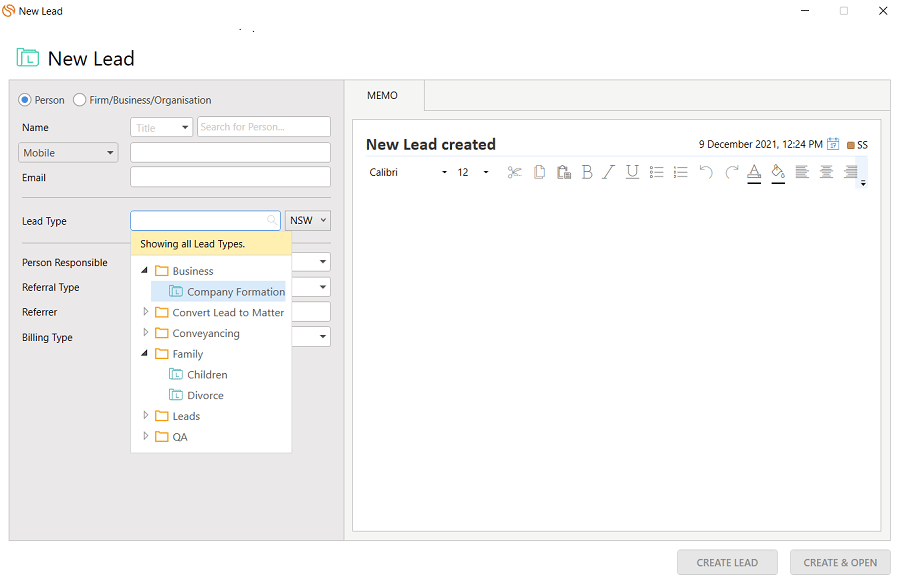 When creating a lead in Smokeball we can see a list of lead Matter Types. Here, *Company Formation* is a lead matter type, under the *Business* category.
### Getting a Lead Matter Type
```bash curl theme={"dark"}
curl --request GET "https://api.smokeball.com/mattertypes?location=IL&type=1" \
--header "x-api-key: Y2xpZW50X2lkOmNsaWV" \
--header "Authorization: Bearer Y2xpZW50X2lkOmNsaWV"
```
```json http theme={"dark"}
{
"method": "get",
"url": "https://api.smokeball.com/mattertypes",
"query": {
"Location": "IL",
"Type": 1 // Use this parameter to get lead specific matter types - where 1=LeadType
}
}
```
**Response**
```json theme={"dark"}
HTTP/1.1 200 OK
Content-Type: application/json
{
"href": "https://api.smokeball.com/mattertypes",
"offset": 0,
"limit": 500,
"size": 18,
"first": {
"href": "https://api.smokeball.com/mattertypes"
},
"value": [
{
"href": "https://api.smokeball.com/mattertypes/8aca3574-aecb-4a6f-991d-680861bece1d_il",
"id": "8aca3574-aecb-4a6f-991d-680861bece1d_IL",
"versionId": "32e86c38-534d-4362-95a1-f5c287a8d4b7",
"name": "Financing",
"category": "Real Estate",
"representativeOptions": [
"Borrower",
"Lender",
"MortgageBroker",
"Seller",
"CooperativeApartment"
],
"location": "IL",
"deleted": false
},
{
"href": "https://api.smokeball.com/mattertypes/2d5aca9b-9469-44d4-8616-766a864432aa",
"id": "2d5aca9b-9469-44d4-8616-766a864432aa",
"versionId": "1410cfea-723e-4514-8901-c92dab1bd5f2",
"name": "Buy",
"category": "Real Estate",
"representativeOptions": [
"Buyer"
],
"location": "IL",
"deleted": false
}
]
}
```
> Here the important information to note is the `id` and `representativeOptions` of the lead matter type. We'll need those when creating a lead.
***
## Contacts
In order to successfully create a lead, we're going to need to provide a contact that is the potential client.
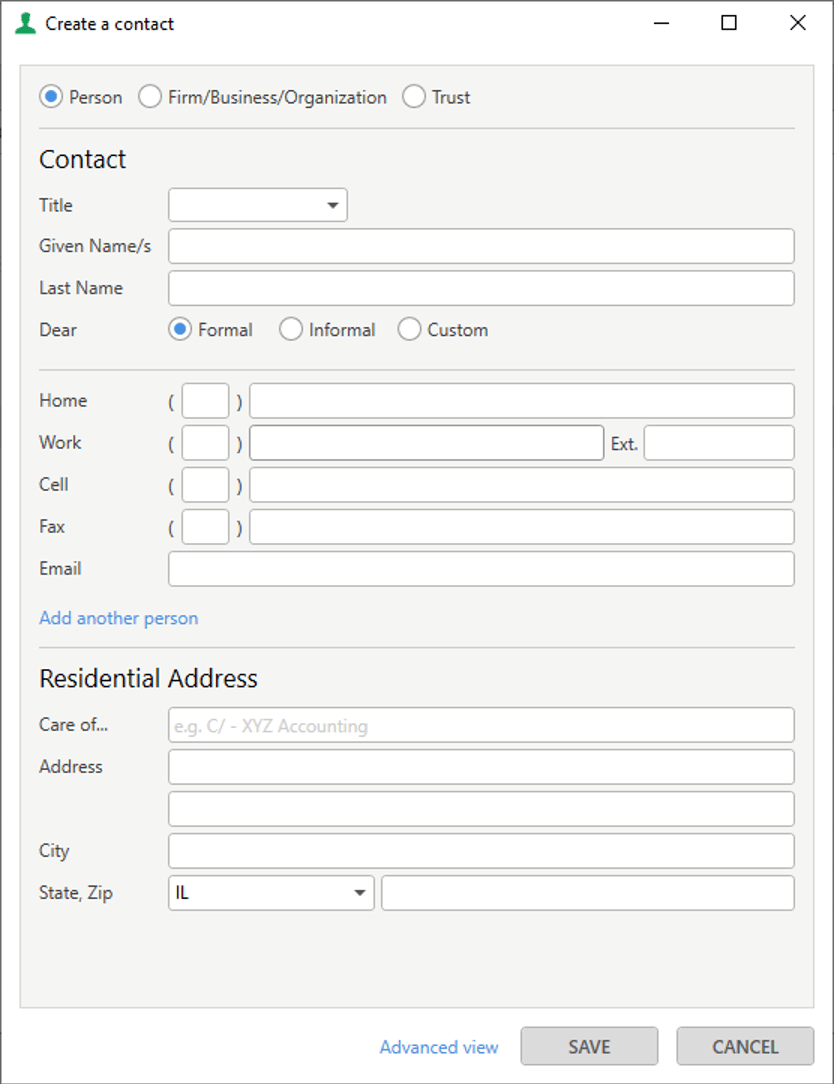
In Smokeball's desktop app you can create a contact as a Person, Firm/Business/Organization or Trust.
Currently, the API supports the following contact types:
* Person
* Company
When creating a lead in Smokeball we can see a list of lead Matter Types. Here, *Company Formation* is a lead matter type, under the *Business* category.
### Getting a Lead Matter Type
```bash curl theme={"dark"}
curl --request GET "https://api.smokeball.com/mattertypes?location=IL&type=1" \
--header "x-api-key: Y2xpZW50X2lkOmNsaWV" \
--header "Authorization: Bearer Y2xpZW50X2lkOmNsaWV"
```
```json http theme={"dark"}
{
"method": "get",
"url": "https://api.smokeball.com/mattertypes",
"query": {
"Location": "IL",
"Type": 1 // Use this parameter to get lead specific matter types - where 1=LeadType
}
}
```
**Response**
```json theme={"dark"}
HTTP/1.1 200 OK
Content-Type: application/json
{
"href": "https://api.smokeball.com/mattertypes",
"offset": 0,
"limit": 500,
"size": 18,
"first": {
"href": "https://api.smokeball.com/mattertypes"
},
"value": [
{
"href": "https://api.smokeball.com/mattertypes/8aca3574-aecb-4a6f-991d-680861bece1d_il",
"id": "8aca3574-aecb-4a6f-991d-680861bece1d_IL",
"versionId": "32e86c38-534d-4362-95a1-f5c287a8d4b7",
"name": "Financing",
"category": "Real Estate",
"representativeOptions": [
"Borrower",
"Lender",
"MortgageBroker",
"Seller",
"CooperativeApartment"
],
"location": "IL",
"deleted": false
},
{
"href": "https://api.smokeball.com/mattertypes/2d5aca9b-9469-44d4-8616-766a864432aa",
"id": "2d5aca9b-9469-44d4-8616-766a864432aa",
"versionId": "1410cfea-723e-4514-8901-c92dab1bd5f2",
"name": "Buy",
"category": "Real Estate",
"representativeOptions": [
"Buyer"
],
"location": "IL",
"deleted": false
}
]
}
```
> Here the important information to note is the `id` and `representativeOptions` of the lead matter type. We'll need those when creating a lead.
***
## Contacts
In order to successfully create a lead, we're going to need to provide a contact that is the potential client.
In Smokeball's desktop app you can create a contact as a Person, Firm/Business/Organization or Trust.
Currently, the API supports the following contact types:
* Person
* Company
 ### Creating a Contact
To create a contact you can make the following request which would create a person called 'Test Contact'.
```bash curl theme={"dark"}
curl --request POST "https://api.smokeball.com/contacts" \
--header "x-api-key: Y2xpZW50X2lkOmNsaWV" \
--header "Authorization: Bearer Y2xpZW50X2lkOmNsaWV" \
--header "Content-Type: application/json" \
--data-raw '{"person":{"firstName":"Test","lastName":"Contact","email":"test@gmail.com"}}'
```
```json http theme={"dark"}
{
"method": "POST",
"url": "https://api.smokeball.com/contacts",
"headers": {
"Content-Type": "application/json"
},
"body": "{\n \"person\": {\n \"firstName\": \"Test\",\n \"lastName\": \"Contact\", \n \"email\": \"test@gmail.com\",\n }\n}\n\n"
}
```
**Response**
```json theme={"dark"}
HTTP/1.1 202 ACCEPTED
Content-Type: application/json
{
"id": "9a9ce552-6bee-45e4-8eb1-afe2c18c489f",
"href": "https://api.smokeball.com/contacts/9a9ce552-6bee-45e4-8eb1-afe2c18c489f"
}
```
Take note of the Contact's `id` returned in the response, we'll need that when creating a lead.
Alternatively, if the contact already exists in Smokeball, you can query it to find it's id.
> *Tip*
>
> When creating a contact you can pass in an `externalSystemId` if you want to store your own reference id with this contact.
***
## Staff
In Smokeball, staff can be assigned to a lead as the **Attorney Responsible** or the **Person Assisting**. The lead list can then be filtered by Attorney responsible, etc.
### Creating a Contact
To create a contact you can make the following request which would create a person called 'Test Contact'.
```bash curl theme={"dark"}
curl --request POST "https://api.smokeball.com/contacts" \
--header "x-api-key: Y2xpZW50X2lkOmNsaWV" \
--header "Authorization: Bearer Y2xpZW50X2lkOmNsaWV" \
--header "Content-Type: application/json" \
--data-raw '{"person":{"firstName":"Test","lastName":"Contact","email":"test@gmail.com"}}'
```
```json http theme={"dark"}
{
"method": "POST",
"url": "https://api.smokeball.com/contacts",
"headers": {
"Content-Type": "application/json"
},
"body": "{\n \"person\": {\n \"firstName\": \"Test\",\n \"lastName\": \"Contact\", \n \"email\": \"test@gmail.com\",\n }\n}\n\n"
}
```
**Response**
```json theme={"dark"}
HTTP/1.1 202 ACCEPTED
Content-Type: application/json
{
"id": "9a9ce552-6bee-45e4-8eb1-afe2c18c489f",
"href": "https://api.smokeball.com/contacts/9a9ce552-6bee-45e4-8eb1-afe2c18c489f"
}
```
Take note of the Contact's `id` returned in the response, we'll need that when creating a lead.
Alternatively, if the contact already exists in Smokeball, you can query it to find it's id.
> *Tip*
>
> When creating a contact you can pass in an `externalSystemId` if you want to store your own reference id with this contact.
***
## Staff
In Smokeball, staff can be assigned to a lead as the **Attorney Responsible** or the **Person Assisting**. The lead list can then be filtered by Attorney responsible, etc.
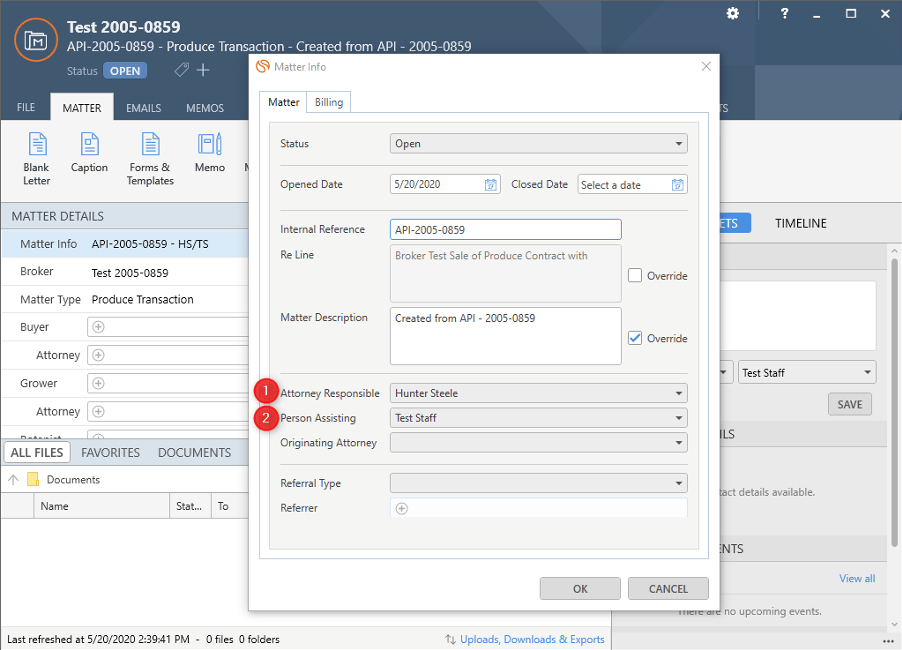 If you want to specify the Attorney Responsible or Person Assisting when creating a lead via the API, then we will first need to retrieve the staff member's id.
```bash curl theme={"dark"}
curl --request GET "https://api.smokeball.com/staff" \
--header "x-api-key: Y2xpZW50X2lkOmNsaWV" \
--header "Authorization: Bearer Y2xpZW50X2lkOmNsaWV"
```
```json http theme={"dark"}
{
"method": "get",
"url": "https://api.smokeball.com/staff"
}
```
**Response**
```json theme={"dark"}
HTTP/1.1 200 OK
Content-Type: application/json
{
"href": "https://api.smokeball.com/staff",
"size": 28,
"first": {
"href": "https://api.smokeball.com/staff"
},
"value": [
{
"href": "https://api.smokeball.com/staff/66f7fa24-bb03-4d89-ac28-e19620cc1e45",
"id": "66f7fa24-bb03-4d89-ac28-e19620cc1e45",
"versionId": "cfdbb798-1f2e-4355-87bc-620cbc62acc2",
"firstName": "Test",
"lastName": "Staff",
"phone": {
"number": "200518540309"
},
"cell": {},
"email": "teststaff@gmail.com",
"avatar": "https://staging.smokeball.com/FirmManagement/Firm/RedirectToStaffProfileImageUrl?accountId=2f3143de-2bfe-4742-9e9c-7c16b48bdef7&staffId=66f7fa24-bb03-4d89-ac28-e19620cc1e45",
"former": false,
"enabled": true
},
{
"href": "https://api.smokeball.com/staff/c85d28cb-a760-4627-aa59-0a853c2e65ed",
"id": "c85d28cb-a760-4627-aa59-0a853c2e65ed",
"versionId": "23dbdc50-6171-4408-8150-413cb293a249",
"title": "",
"firstName": "Hunter",
"lastName": "Steele",
"email": "hunter@gmail.com",
"avatar": "https://staging.smokeball.com/FirmManagement/Firm/RedirectToStaffProfileImageUrl?accountId=2f3143de-2bfe-4742-9e9c-7c16b48bdef7&staffId=c85d28cb-a760-4627-aa59-0a853c2e65ed",
"former": false,
"enabled": false
}
]
}
```
***
## Creating a lead
Now we have everything we need to create a lead.
```bash theme={"dark"}
curl --request POST "https://api.smokeball.com/matters" \
--header "x-api-key: Y2xpZW50X2lkOmNsaWV" \
--header "Authorization: Bearer Y2xpZW50X2lkOmNsaWV" \
--header "Content-Type: application/json" \
--data-raw '{"matterTypeId":"8aca3574-aecb-4a6f-991d-680861bece1d_IL","clientIds":["9a9ce552-6bee-45e4-8eb1-afe2c18c489f"],"clientRole":"Borrower","description":"Created via API","status":"Open","dateOpened":"2020-05-20T04:20:55.035Z","personResponsibleStaffId":"c85d28cb-a760-4627-aa59-0a853c2e65ed","personAssistingStaffId":"66f7fa24-bb03-4d89-ac28-e19620cc1e45","isLead":true}'
```
```json theme={"dark"}
{
"method": "POST",
"url": "https://api.smokeball.com/matters",
"headers": {
"Content-Type": "application/json"
},
"body": {
"matterTypeId": "8aca3574-aecb-4a6f-991d-680861bece1d_IL",
"clientIds": [
"9a9ce552-6bee-45e4-8eb1-afe2c18c489f"
],
"clientRole": "Borrower",
"description": "Created via API",
"status": "Open",
"dateOpened": "2020-05-20T04:20:55.035Z",
"personResponsibleStaffId": "c85d28cb-a760-4627-aa59-0a853c2e65ed",
"personAssistingStaffId": "66f7fa24-bb03-4d89-ac28-e19620cc1e45",
"isLead": true
}
}
```
Bearer token for user authentication.
Format: `Bearer YOUR_ACCESS_TOKEN`
Must be `application/json` for this endpoint.
The lead type identifier.
Example: `8aca3574-aecb-4a6f-991d-680861bece1d_IL` (the id we found earlier).
Contact Ids associated with the lead.
Minimum: 1 client required.
Example: `["9a9ce552-6bee-45e4-8eb1-afe2c18c489f"]`
The client's role in the lead (e.g., "Borrower", "Seller").
If left blank, the default role associated to the lead type will be used.
Example: `"Borrower"`
Description of the lead.
Example: `"Created via API"`
Initial lead status (typically "Open").
Can be `Open`, `Pending`, `Closed`, `Deleted` or `Cancelled`
Example: `"Open"`
Lead creation date in ISO 8601 format (this can be backdated).
Example: `"2020-05-20T04:20:55.035Z"`
Staff Id of the primary responsible staff member (optional).
Example: `"c85d28cb-a760-4627-aa59-0a853c2e65ed"`
Staff Id of the assisting staff member (optional).
Example: `"66f7fa24-bb03-4d89-ac28-e19620cc1e45"`
Whether the matter is marked as a lead (default: false).
Example: `true`
**Response**
```json theme={"dark"}
HTTP/1.1 202 ACCEPTED
Content-Type: application/json
{
"id": "51cefb72-6247-4ca2-8926-5d14d65f7cb9",
"href": "https://api.smokeball.com/matters/51cefb72-6247-4ca2-8926-5d14d65f7cb9"
}
```
If you want to specify the Attorney Responsible or Person Assisting when creating a lead via the API, then we will first need to retrieve the staff member's id.
```bash curl theme={"dark"}
curl --request GET "https://api.smokeball.com/staff" \
--header "x-api-key: Y2xpZW50X2lkOmNsaWV" \
--header "Authorization: Bearer Y2xpZW50X2lkOmNsaWV"
```
```json http theme={"dark"}
{
"method": "get",
"url": "https://api.smokeball.com/staff"
}
```
**Response**
```json theme={"dark"}
HTTP/1.1 200 OK
Content-Type: application/json
{
"href": "https://api.smokeball.com/staff",
"size": 28,
"first": {
"href": "https://api.smokeball.com/staff"
},
"value": [
{
"href": "https://api.smokeball.com/staff/66f7fa24-bb03-4d89-ac28-e19620cc1e45",
"id": "66f7fa24-bb03-4d89-ac28-e19620cc1e45",
"versionId": "cfdbb798-1f2e-4355-87bc-620cbc62acc2",
"firstName": "Test",
"lastName": "Staff",
"phone": {
"number": "200518540309"
},
"cell": {},
"email": "teststaff@gmail.com",
"avatar": "https://staging.smokeball.com/FirmManagement/Firm/RedirectToStaffProfileImageUrl?accountId=2f3143de-2bfe-4742-9e9c-7c16b48bdef7&staffId=66f7fa24-bb03-4d89-ac28-e19620cc1e45",
"former": false,
"enabled": true
},
{
"href": "https://api.smokeball.com/staff/c85d28cb-a760-4627-aa59-0a853c2e65ed",
"id": "c85d28cb-a760-4627-aa59-0a853c2e65ed",
"versionId": "23dbdc50-6171-4408-8150-413cb293a249",
"title": "",
"firstName": "Hunter",
"lastName": "Steele",
"email": "hunter@gmail.com",
"avatar": "https://staging.smokeball.com/FirmManagement/Firm/RedirectToStaffProfileImageUrl?accountId=2f3143de-2bfe-4742-9e9c-7c16b48bdef7&staffId=c85d28cb-a760-4627-aa59-0a853c2e65ed",
"former": false,
"enabled": false
}
]
}
```
***
## Creating a lead
Now we have everything we need to create a lead.
```bash theme={"dark"}
curl --request POST "https://api.smokeball.com/matters" \
--header "x-api-key: Y2xpZW50X2lkOmNsaWV" \
--header "Authorization: Bearer Y2xpZW50X2lkOmNsaWV" \
--header "Content-Type: application/json" \
--data-raw '{"matterTypeId":"8aca3574-aecb-4a6f-991d-680861bece1d_IL","clientIds":["9a9ce552-6bee-45e4-8eb1-afe2c18c489f"],"clientRole":"Borrower","description":"Created via API","status":"Open","dateOpened":"2020-05-20T04:20:55.035Z","personResponsibleStaffId":"c85d28cb-a760-4627-aa59-0a853c2e65ed","personAssistingStaffId":"66f7fa24-bb03-4d89-ac28-e19620cc1e45","isLead":true}'
```
```json theme={"dark"}
{
"method": "POST",
"url": "https://api.smokeball.com/matters",
"headers": {
"Content-Type": "application/json"
},
"body": {
"matterTypeId": "8aca3574-aecb-4a6f-991d-680861bece1d_IL",
"clientIds": [
"9a9ce552-6bee-45e4-8eb1-afe2c18c489f"
],
"clientRole": "Borrower",
"description": "Created via API",
"status": "Open",
"dateOpened": "2020-05-20T04:20:55.035Z",
"personResponsibleStaffId": "c85d28cb-a760-4627-aa59-0a853c2e65ed",
"personAssistingStaffId": "66f7fa24-bb03-4d89-ac28-e19620cc1e45",
"isLead": true
}
}
```
Bearer token for user authentication.
Format: `Bearer YOUR_ACCESS_TOKEN`
Must be `application/json` for this endpoint.
The lead type identifier.
Example: `8aca3574-aecb-4a6f-991d-680861bece1d_IL` (the id we found earlier).
Contact Ids associated with the lead.
Minimum: 1 client required.
Example: `["9a9ce552-6bee-45e4-8eb1-afe2c18c489f"]`
The client's role in the lead (e.g., "Borrower", "Seller").
If left blank, the default role associated to the lead type will be used.
Example: `"Borrower"`
Description of the lead.
Example: `"Created via API"`
Initial lead status (typically "Open").
Can be `Open`, `Pending`, `Closed`, `Deleted` or `Cancelled`
Example: `"Open"`
Lead creation date in ISO 8601 format (this can be backdated).
Example: `"2020-05-20T04:20:55.035Z"`
Staff Id of the primary responsible staff member (optional).
Example: `"c85d28cb-a760-4627-aa59-0a853c2e65ed"`
Staff Id of the assisting staff member (optional).
Example: `"66f7fa24-bb03-4d89-ac28-e19620cc1e45"`
Whether the matter is marked as a lead (default: false).
Example: `true`
**Response**
```json theme={"dark"}
HTTP/1.1 202 ACCEPTED
Content-Type: application/json
{
"id": "51cefb72-6247-4ca2-8926-5d14d65f7cb9",
"href": "https://api.smokeball.com/matters/51cefb72-6247-4ca2-8926-5d14d65f7cb9"
}
```